In today’s busy world, nobody wants to waste precious time driving to a store just to make a payment. That’s why Ivan Smith Furniture has created a super convenient online bill pay system for their customers. If you’ve recently purchased furniture appliances or electronics from Ivan Smith and need to make a payment on your account, you’re in the right place!
I’ve been using their online payment system for a while now, and it’s saved me tons of time. Let me share everything you need to know about Ivan Smith online bill pay options so you can manage your payments without leaving your home.
What is Ivan Smith Online Bill Pay?
Ivan Smith online bill pay is a digital payment service that lets customers make payments on their furniture store accounts through the internet. This service is available for customers who have:
- In-house installment plans
- Ivan’s Premier Customer Card
The system is designed to be user-friendly and accessible 24/7, making it super convenient for busy people who don’t have time to visit a physical store location
Why Use Ivan Smith’s Online Bill Pay Option?
There are several benefits to using the online bill pay system:
- Convenience: Pay anytime, anywhere with internet access
- Time-saving: No need to drive to a store or mail a check
- Security: Secure payment processing through PayJunction
- Immediate processing: Same-day payment processing
- Account management: View transaction history and check balances
- Go paperless: Reduce paper waste and keep track digitally
Two Types of Ivan Smith Bill Pay Options
Ivan Smith Furniture offers two different payment options for customers, depending on the type of financing you have:
1. In-House Installment Bill Pay
This option is for customers who have financed their purchase directly through Ivan Smith Furniture. The process is simple:
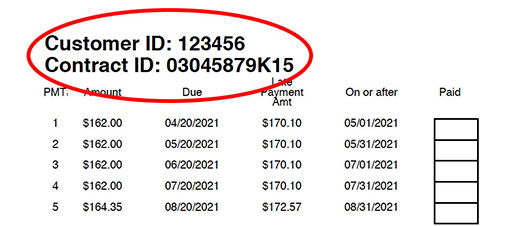
- Gather your Customer ID and Contract Number (found on loan documents)
- Visit the Online Bill Pay page
- Enter your payment amount in the format “170.10” (dollars and cents)
- Click “Pay Now”
- Complete the payment process through PayJunction
If you’ve lost your customer information, don’t worry! Just contact your local Ivan Smith store, and they can help you find your Customer ID and Contract Number.
2. Ivan’s Premier Customer Card Bill Pay
If you have the Ivan’s Premier Customer Card (processed through Synchrony). you’ll follow a different process
- Click on the link to access your Synchrony Account
- Log in to your account
- From there, you can:
- View transaction history
- Make same-day payments
- Check your balance
- Set up paperless billing
The Synchrony system provides complete account management, not just payment processing.
How to Use In-House Installment Bill Pay
Let me walk you through the process step by step:
What You’ll Need Before Starting
- Your Customer ID
- Your Contract Number
- The payment amount you wish to make
- A credit or debit card for payment
Step-by-Step Instructions
-
Visit the Ivan Smith Online Bill Pay Page
-
Locate the In-House Installment Bill Pay Section
- This is usually at the top of the page
-
Enter Your Payment Information
- Input your dollar amount in the format “170.10”
- Double-check that the amount is correct
-
Click “Pay Now”
- This will take you to the PayJunction processing screen
-
Complete Payment Details
- Enter your credit/debit card information
- Provide any other required information
- Submit your payment
-
Save Your Confirmation
- Make sure to note your confirmation number
- I recommend taking a screenshot for your records
How to Use Ivan’s Premier Customer Card Bill Pay
If you’re using the Synchrony option, here’s what you’ll do:
-
Visit the Online Bill Pay Page
-
Find the Ivan’s Premier Customer Card Section
- Look for the Synchrony account access link
-
Click “Click Here to Access your Synchrony Account”
- This will redirect you to the Synchrony Financial website
-
Log In to Your Synchrony Account
- Enter your username and password
- If you haven’t registered yet, you’ll need to create an account
-
Navigate to the Payment Section
- Once logged in, look for the payment option
-
Enter Payment Details
- Input the amount you wish to pay
- Select your payment method
- Choose your payment date
-
Confirm and Submit Payment
- Review all information for accuracy
- Submit your payment
- Save your confirmation details
Common Questions About Ivan Smith Online Bill Pay
What if I don’t know my Customer ID or Contract Number?
If you can’t find this information, simply call your local Ivan Smith store or check your loan documents. The customer service team is really helpful with this kind of stuff.
Is online bill pay secure?
Yes! Ivan Smith uses PayJunction for processing in-house installment payments, which is a secure payment processor. The Synchrony Financial portal also uses encryption and security measures to protect your information.
Can I make partial payments?
Absolutely. You can enter any amount you wish to pay, as long as it meets the minimum payment requirement on your account.
When will my payment be processed?
Payments made through both systems are typically processed on the same day. However, it might take 1-2 business days for the payment to reflect on your account.
Is there a fee for using online bill pay?
In most cases, there’s no fee for using the online bill pay service, but it’s always good to check the terms when making a payment.
What if I make a mistake on my payment?
If you realize you’ve made a mistake, contact Ivan Smith customer service immediately. They can help resolve the issue.
Ivan Smith Furniture Store Locations
One of the great things about Ivan Smith is their wide presence across multiple states. If you ever need to visit a store in person, they have locations in:
Louisiana
- Bossier City
- Minden
- Ruston
- De Ridder
- Alexandria
- Monroe
- Shreveport
Texas
- Texarkana
- Lufkin
- Paris
- Nacogdoches
- Greenville
- Gun Barrel
- Marshall
- Longview
- Tyler
Arkansas
- Magnolia
- Crossett
- El Dorado
What Else Can You Do on the Ivan Smith Website?
While you’re on the Ivan Smith website to pay your bill, you might want to explore some other helpful features:
- Track Your Delivery: See when your furniture will arrive
- Browse New Products: Check out the latest furniture and appliances
- Find Current Promotions: Look for deals and discounts
- Access Your Account: View your purchase history and account details
- Explore Financing Options: Learn about different payment plans
My Personal Experience with Ivan Smith Online Bill Pay
I’ve been using Ivan Smith’s online bill pay system for about a year now since I purchased my living room set, and it’s been a total game-changer. Before, I used to forget to mail my payment or would have to rush to the store before closing time. Now, I can literally pay my bill while sitting on the very furniture I’m paying for!
Last month, I actually forgot my payment was due until 10 PM. Instead of panicking, I just hopped online, made the payment in less than 2 minutes, and went back to watching my favorite show. The system is really that simple.
Tips for Successful Online Bill Payment
Here are a few pro tips I’ve learned along the way:
- Set calendar reminders for your payment due dates
- Save your confirmation numbers in a dedicated folder
- Keep your Customer ID and Contract Number somewhere easily accessible
- Check your email for payment confirmations
- Review your account periodically to ensure payments are posting correctly
Final Thoughts on Ivan Smith Online Bill Pay
Ivan Smith’s online bill pay system makes managing your furniture payments incredibly easy and convenient. Whether you have an in-house installment plan or an Ivan’s Premier Customer Card, you can handle all your payment needs from the comfort of your home.
The system is straightforward, secure, and available whenever you need it. No more rushing to the store before closing or worrying about mailing checks on time. It’s just one more way Ivan Smith Furniture puts customer convenience first.
If you haven’t tried it yet, I highly recommend giving it a go for your next payment. You’ll probably wonder why you didn’t start using it sooner!
Remember, if you ever have questions or run into issues with the online bill pay system, Ivan Smith’s customer service team is just a phone call away and always ready to help.
Happy online bill paying!
Learn about our networks
Shop at thousands of retailers across the country with a Synchrony HOME™ or Synchrony Car Care™ credit card.
Retail credit cards and financing
Shop at thousands of your favorite stores and brands we partner with all across the country.
