Need to get in touch with AT&T customer service? For the best experience, it’s important to call the right number for the assistance you need. You’ll find customer service contact info for AT&T services below.
The AT&T customer service number is the best number for current AT&T internet and home phone customers to call regarding their service. Call (800) 288-2020
Hey there, folks! If you’re scramblin’ to figure out how to pay your AT&T cell phone bill over the phone, you’ve landed in the right spot. I know the drill—bill’s due, you don’t wanna mess with online stuff, and you just need a number to call, pronto. Well, I’ve gotcha covered. Let’s dive straight into the nitty-gritty of gettin’ that bill paid without breakin’ a sweat. We’re gonna start with the magic phone number and walk through every step, plus toss in some extra tricks I’ve picked up along the way.
The Phone Number to Pay Your AT&T Cell Phone Bill
Alright, no fluff—here’s the deal. If you’re using your AT&T mobile phone just dial 611. It’s the quickest way to get through to someone who can help you pay that bill. Ain’t on your AT&T phone? No worries, call 1-800-331-0500. That’s the go-to number for wireless customers, and it works like a charm. I’ve dialed 611 myself a buncha times and it’s usually a breeze to get connected.
Wanna make it even faster? You can punch in *PAY or *729 right from your AT&T phone. If you’re a Spanish speaker use *PAGAR or *72427 instead. These codes skip some of the menu nonsense and get you straight to the payment part. Pretty slick, right?
Just a heads up, though—these lines for wireless support are open every day from 7 a.m. to 10 p.m. local time. So, don’t be callin’ at midnight expectin’ a human on the other end. Plan your call durin’ those hours, and you’re golden.
How to Pay Your AT&T Bill Over the Phone: Step-by-Step
Now that you’ve got the number, let’s break down how this actually works. I’m gonna walk ya through it like I’m sittin’ right next to ya, makin’ sure you don’t miss a beat.
- Dial the Number: Use 611 if you’re on your AT&T mobile, or 1-800-331-0500 from any other phone. Alternatively, hit up *PAY (or *729) for a quick shortcut.
- Follow the Voice Prompts: Once connected, you’ll hear an automated voice. Don’t panic—it’s just gonna guide ya. Listen for the option to pay your bill. Usually, it’s pretty upfront.
- Choose Your Payment Method: You’ll get asked how you wanna pay. Press 1 if you’re usin’ a bank account (checkin’ or savings), or hit 2 if you’re payin’ with a credit or debit card. Easy peasy.
- Enter Your Info: The system will tell ya when to punch in your account or card details. Take it slow—don’t fat-finger the numbers or you’ll hafta start over. I’ve done that before, and it’s a real pain.
- Confirm and Done: After enterin’ your payment info, the system’ll spit out a confirmation number. Write that bad boy down or screenshot it if they text it to ya. That’s your proof the payment went through.
That’s it! You’re done in, like, five minutes tops if the line ain’t busy. If somethin’ goes wonky, like the system don’t accept your card, just hang tight—I’ll cover what to do next later on.
Why Pay Over the Phone? The Perks We Love
I get it—there’s a million ways to pay a bill these days. So why bother with the phone? Here’s why I dig this method, and maybe you will too
- It’s Quick: No need to log into apps or websites. Just dial, punch in some numbers, and bam—bill paid.
- No Internet Needed: If your Wi-Fi’s down or you’re out in the boonies with no data, a phone call still works as long as you got signal.
- Personal Touch: Sometimes, if the automated system ain’t cuttin’ it, you can press a button to talk to a real person. That’s saved my bacon when I had a weird billing question.
- Secure Enough: I’ve never had an issue with givin’ my card info over the phone to AT&T. It’s all encrypted or whatever, so I don’t sweat it too much.
Payin’ by phone is my go-to when I’m in a rush or just don’t feel like dealin’ with tech. But, if you’re curious about other ways, stick with me—I’ve got more options comin’ up.
What If the Phone Payment Don’t Work?
Alright, let’s be real—sometimes tech fails us. Maybe the automated system glitches, or your card gets declined for no dang reason. Don’t throw your phone across the room just yet. Here’s what I do when things go south:
- Double-Check Your Info: Make sure you entered the right account or card number. One wrong digit, and it’s a no-go. I’ve flubbed this more times than I care to admit.
- Call Back: If the system hangs up or acts weird, just redial 611 or 1-800-331-0500. Sometimes, you just get a bad connection.
- Speak to Someone: Most times, you can press a key (like 0 or say “representative”) to get a live person. Tell ‘em what’s up, and they’ll sort it out.
- Check Your Bank or Card: If payment keeps failin’, call your bank or check if your card’s got enough funds. Might be a hold or somethin’ on their end.
If all else fails, don’t stress. There’s other ways to pay your AT&T cell phone bill, and I’m gonna lay ‘em out for ya next. We ain’t stuck with just the phone.
Other Ways to Pay Your AT&T Cell Phone Bill
Look, payin’ by phone is great, but sometimes you wanna switch it up, or maybe you just don’t trust givin’ info over a call. No judgment here! I’ve tried a buncha different methods myself, and here’s the lowdown on the best alternatives.
Pay Online: Super Convenient
If you got a computer or smartphone handy, payin’ online is a snap. Head over to the AT&T website, sign into your account, and look for the “View Your Statement” or “Pay Bill” option. You can use a card or bank account, just like on the phone. It’s nice ‘cause you get a visual of what you owe, and you can set up auto-payments if you’re forgetful like me.
Use the AT&T App
They got this app called myAT&T, and it’s a game-changer. Download it, log in, and you can pay your bill right from there. It’s basically the website but on your phone, and sometimes they even throw in a discount if you set up automatic payments. I’ve used it when I’m out and about—saves me from callin’ in.
Text to Pay: Sneaky Fast
Here’s a cool trick I stumbled on. If you enroll in somethin’ called TXT-2-PAY with AT&T, they’ll text ya ‘bout six days before your bill’s due with the amount. Just reply to that text, and it uses the payment info you already set up. No call, no app, just a quick text. It’s perfect if you’re always on the go.
Pay by Mail: Old School Vibes
If you’re more of a paper-and-pen kinda person, you can mail in a check or money order. Find the payment address on your bill statement, slap a stamp on it, and send it off. Just make sure you mail it early—don’t wanna be late ‘cause the post office took its sweet time.
In-Person at an AT&T Store
Got an AT&T store nearby? Walk in durin’ their hours and pay at the counter. You can use cash, card, or check, whatever floats your boat. Use their store locator online to find the closest spot. I’ve done this when I needed to ask a question face-to-face—plus, you get a receipt right then and there.
Here’s a quick table to sum up these options, so you can pick what works best for ya:
| Payment Method | How to Do It | Best For |
|---|---|---|
| Phone | Dial 611 or 1-800-331-0500, follow prompts | Quick, no internet needed |
| Online | Sign in at AT&T site, pay via account | Visual confirmation, auto-pay |
| AT&T App | Download myAT&T, pay in-app | On-the-go, possible discounts |
| Text (TXT-2-PAY) | Enroll, reply to text reminder | Super fast, minimal effort |
| Send check/money order to address on bill | Traditional, no tech required | |
| In-Person | Visit AT&T store, pay at counter | Personal help, immediate receipt |
Tips to Make Payin’ Your AT&T Bill a Breeze
Over the years, I’ve figured out some little hacks to keep this bill-payin’ stuff stress-free. Lemme share a few nuggets of wisdom with ya:
- Set a Reminder: Bills sneak up on ya. Put a note in your calendar a week before it’s due, so you ain’t rushin’ last minute.
- Save the Number: Add 611 or 1-800-331-0500 to your contacts as “AT&T Bill Pay.” Next time, it’s just a tap away.
- Go Auto-Pay: If you keep forgettin’, set up automatic payments through the app or online. Sometimes, AT&T even cuts ya a small discount for it.
- Keep Records: Whether it’s a confirmation number from a phone payment or a receipt from in-store, hang onto it. Never know when you’ll need proof.
- Check for Fees: Some payment methods might tack on a tiny fee, ‘specially if you’re usin’ a card over the phone. Ask or check online to avoid surprises.
These lil’ tricks have saved me from late fees and headaches more times than I can count. Try ‘em out, and you’ll thank me later.
Common Hiccups and How to Fix ‘Em
Even with the best plans, stuff goes sideways sometimes. Here’s some common snags I’ve hit when payin’ my AT&T bill, and how I got around ‘em:
- “I Can’t Get Through!”: If the line’s busy or disconnected, try again in a few minutes. Peak hours (like right after work) can jam up the system. Or switch to the app if you’re fed up.
- “My Payment Didn’t Post!”: Give it a day or two—sometimes it takes a bit to show up. If it’s still missin’, call back with your confirmation number handy.
- “Wrong Account Charged!”: If you got multiple AT&T accounts, double-check which one you’re payin’. The app or online portal shows ya exactly which line or service you’re coverin’.
- “I Don’t Speak English Well.”: No problemo—if Spanish is your thing, use *PAGAR or *72427 for phone payments. The prompts switch to Spanish, and it’s all good.
I’ve run into most of these at least once, and trust me, they’re fixable with a little patience. If you’re still stuck, hit up a live rep—they’re usually pretty helpful.
Why Timely Bill Payment Matters
I know, I know—nobody likes shellin’ out cash for bills. But lemme tell ya why keepin’ up with your AT&T cell phone bill is a big deal. First off, late payments can slap ya with fees. Them extra charges add up quick, and I’ve learned that the hard way. Plus, if you’re super late, they might cut off your service. Ain’t nobody got time for a dead phone, ‘specially if you rely on it for work or family stuff.
Payin’ on time also keeps your credit score from takin’ a hit. Yeah, some companies report late payments, and that messes with your financial rep. So, whether you’re callin’ 611, usin’ the app, or mailin’ a check, just get it done before the due date. Set a reminder if ya gotta—I sure do.
Extra Goodies from AT&T You Might Wanna Know
While we’re talkin’ AT&T, lemme throw in a couple bonus tidbits I’ve picked up. They got more than just bill-pay options up their sleeve. For instance, if you’re an internet customer too, you can tap into over 30,000 Wi-Fi hotspots across the country. Just enable Wi-Fi on your device, look for “attwifi,” and log in with your account. It’s a lifesaver when you’re travelin’ and don’t wanna burn through data.
Also, if you’re ever havin’ tech issues—like your phone won’t connect or your bill looks funky—you can troubleshoot online through their support page. No need to call unless it’s real bad. I’ve fixed a couple glitches myself just by pokin’ around their help guides.
Wrappin’ It Up with a Bow
So, there ya have it—a full-on guide to payin’ your AT&T cell phone bill with the phone number you need (611 or 1-800-331-0500, in case you forgot). We walked through the steps, hashed out some backup plans, and even tossed in tips to keep things smooth. I’ve been down this road plenty, and I’m tellin’ ya, it don’t hafta be a hassle. Pick the method that fits your style—whether it’s a quick call, a text reply, or strollin’ into a store—and get that bill outta the way.
Got questions or run into a weird issue I didn’t cover? Drop a comment below, and I’ll do my best to help ya out. For now, go dial that number or set up your payment, and let’s keep them phone lines active. Catch ya later!
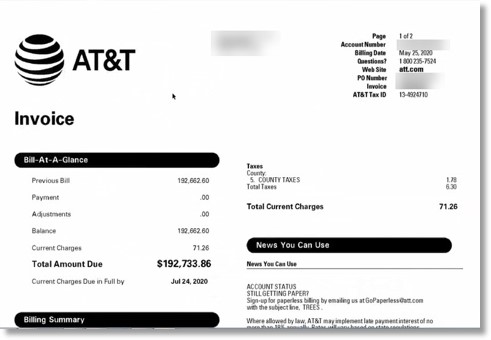
Additional AT&T customer service contacts
Need to contact AT&T customer service with a question, make changes to your AT&T account or voice a concern? Along with calling the AT&T customer service number, there are a few ways you can chat with AT&T support.
-
Chat live with an AT&T representative 24/7
Visit: AT&T – Contact Us. Then tap on Chat Available and choose which AT&T service you’d like to live chat about. Available Monday – Friday, 8 a.m. – 8 p.m. CT, Saturday – Sunday, 9 a.m. – 7 p.m. CT.
-
Social media
Contact AT&T social media pages for a quick response, and for service news and updates. Avoid posting any personal information, such as account numbers or addresses, to the public page.
-
Find an AT&T store location
Use the AT&T store locator to find the nearest AT&T store or AT&T authorized retailer.
-
Find answers to frequently asked questions
Visit the AT&T support page to see more details about AT&T’s COVID-19 response along with other popular topics.
Ready to order new AT&T services?
Call now to speak with an AT&T expert about new AT&T internet, TV and home phone services in your area. We’ll help you find the best AT&T deals for your home. Learn more about the services AT&T offers.
How To Pay Your AT&T Bill Online
FAQ
How do I Pay my AT&T bill?
Make a single payment to your AT&T account any of the following ways: Pay bill by phone: (800) 288-2020. Call the AT&T customer bill pay number, Monday – Friday, 8 a.m. – 8 p.m. CT, Saturday, 9 a.m. – 7 p.m. CT. Pay bill by text: Download the myAT&T app and log in to your account on the app to make payments.
How do I Pay my AT&T bill without logging into my account?
If you don’t want to log into your AT&T account to pay your bill, you’ve got a few options: Fast Pay lets you pick your AT&T service (i.e., cellular, internet, etc.), enter your phone number or account information, zip code, and payment details. You can visit an AT&T store in person to pay your bill.
How do I Check my AT&T account?
Be sure to use your home phone or internet username and password. This probably isn’t the same info you used to check your AT&T email. Have AT&T service? Sign in with your user ID. Log into myAT&T to view and pay your AT&T bills online, manage your account, or upgrade your AT&T Wireless, U-verse, Internet, and Home Phone services.
How do I Pay my AT&T bill over text message?
How to pay your AT&T bill over text message If you have a wireless account, you can go here to enroll in TXT-2-PAY using your tablet or computer. This is a free-of-charge service that texts you your wireless balance six days before it is due.
How do I contact AT&T customer service?
The AT&T customer service number is the best number for current AT&T internet and home phone customers to call regarding their service. Call (800) 288-2020 AT&T wireless customers should call 611 or (800) 331-0500 from their AT&T mobile phone — not the main AT&T customer service number — for the best experience.
Can I Pay my AT&T bill in person?
Of course, you can always go into your local AT&T retail location to pay your bill. Some retail locations have an AT&T Pay Station that allows cash, check, debit, or credit card payments. While you’re paying your bill in person, you can ask questions about your account and maybe upgrade to an unlimited data plan.
How do I pay my AT&T bill over the phone?
What is the number for 1 800 331 0500?
AT&T DOMESTIC WIRELESS CUSTOMER CARE NUMBER
For AT&T Wireless Customer Support, contact -800-331-0500.
What is the 1-800-customer service number for AT&T Wireless pay?
| Business Center Support | Log in to chat Get help logging in Business Center Support |
|---|---|
| Wireless Support | 800.331.0500 myAT&T Support Premier Support |
| Uverse | 800.321.2000 |
How do I call AT&T about my phone bill?
866-925-4389. You can check your bill, setup AutoPay, or make a payment by signing in here. Something not working right?
