This article will provide an in depth look at Unisource Energy Services and explain how customers can take advantage of their services to pay bills, check outages, and access customer service and phone numbers. Unisource Energy Services provides a convenient way for customers to remain informed and organized throughout the payment and usage processes, and this article will explore the importance of understanding the services they provide. It is essential for customers to understand how Unisource Energy Services can benefit them, and how the company is committed to making sure customer needs are met.
Are you tired of writing checks and mailing them every month? Or maybe you’ve forgotten to pay your UniSource bill once too often? I’ve been there too! That’s why I’m sharing everything I know about UniSource online bill pay – a service that has made my life so much easier when it comes to managing my utility payments.
What is UniSource Energy Services?
UniSource Energy Services (UES) is a utility company providing gas and electric services to many communities They’ve partnered with KUBRA EZ-PAY to offer customers a convenient way to pay bills online without the hassle of paper checks or in-person visits
How to Access UniSource Online Bill Pay
There are two main ways to access UniSource’s online payment system:
- Through the My Account portal at account.uesaz.com
- Via the KUBRA EZ-PAY system at ez-pay.io
Both portals will allow you to manage your payments, but they offer slightly different features which I’ll explain below.
KUBRA EZ-PAY: UniSource’s Payment Platform
When I first needed to pay my UES bill online, I was directed to the KUBRA EZ-PAY system. This is the payment platform that UniSource uses to process online payments The system is pretty straightforward and has a 4-step process
- Look Up – Enter your account information
- Add – Add your payment method
- Check Out – Review and confirm payment
- Done – Get your receipt
Important Things to Know About KUBRA EZ-PAY
Before you start using the system, there are a few important points you should be aware of:
- Convenience Fee: UES charges a convenience fee when you pay online through KUBRA EZ-PAY. This fee covers the cost of processing your payment.
- Payment Methods: You can pay using credit card, debit card, bank account, or even cash (at certain retail locations).
- Disconnection Notice: If you’ve received a disconnection notice, make sure to call (877) 837-4968 after making your payment to prevent disconnection or arrange reconnection.
Step-by-Step Guide to Paying Your UniSource Bill Online
Finding Your Account Number
The first step to paying online is having your account number ready. If you’re wondering where to find it:
“Your account number can be found on your recent bill.”
This is usually printed prominently on your paper bill or included in your email notification if you receive e-bills.
Using the KUBRA EZ-PAY System
- Visit the KUBRA EZ-PAY portal
- Enter your account number in the designated field
- Follow the prompts to select your payment method
- Review the amount due plus any convenience fees
- Confirm and submit your payment
- Save your receipt for your records
Payment Options Available
UniSource offers several payment methods to accommodate different preferences:
Online Payment Methods
- Credit Cards: Most major credit cards accepted
- Debit Cards: Works just like using a credit card
- Bank Account: Direct debit from your checking or savings account
Other Payment Options
- Cash Payments at Retail Locations: If you prefer to pay with cash, you can use the EZ-Payslip system at participating retailers
- Scheduled Payments: Set up future payments in advance
- Recurring Payments: Automatic payments every billing cycle
Setting Up Recurring Payments
One feature I really appreciate is the ability to set up recurring payments. Here’s how it works:
- Create an account on the payment platform
- Store your billing information securely
- Set up a schedule for automatic payments
- Choose whether to pay a fixed amount or the full bill amount each time
This saves me from having to remember due dates every month. The system automatically processes my payment before the due date, ensuring I never incur late fees.
Important Timing Considerations
According to KUBRA’s terms:
“If your payment is received after the due date of your bill, for any reason, you will remain responsible for any late charges and interest assessed. As a result, we recommend that you authorize your payment at least four (4) business days before the actual due date.”
This is important to remember! Even though you’re paying online, the payment processing isn’t instant. KUBRA recommends allowing 4 business days for your payment to be credited to your account.
Notification Features
Another helpful feature is the ability to receive notifications about your bill and payments:
- Receipt Notifications: Get confirmation when your payment has processed
- Payment Due Reminders: Receive alerts when your bill is coming due
- SMS Alerts: Get texts for important account updates
These notifications have saved me from late payments multiple times!
Security Concerns
I know many people worry about entering their payment information online. KUBRA takes security seriously and implements various measures to protect your information:
- Secure encrypted connections
- Privacy policies that prohibit selling your personal information
- Compliance with relevant data protection regulations
What If You Overpay?
Sometimes mistakes happen. If you accidentally pay more than your bill amount:
“If you over pay on your account, you may not be entitled to a refund. If a refund is allowed, it will be processed to the same payment account that the payment came from.”
It’s worth noting that refunds for ACH payments (direct bank transfers) won’t be processed until at least 10 business days after KUBRA receives the refund request.
Troubleshooting Common Issues
Payment Not Showing Up
If you’ve made a payment but it’s not showing on your account, remember that:
“It is the day your payment is received, not the day that instructions are sent that determines if your bill was paid on time.”
Allow 3-4 business days for processing before contacting customer service.
Technical Difficulties
If you’re experiencing technical issues with the online payment system, you can:
- Try using a different browser
- Clear your browser cache and cookies
- Contact UES customer service at 1-877-837-4968
Customer Support Options
If you need help with your online bill payment, UES provides several support options:
- Phone Support: Call 1-877-837-4968
- Website: Visit the UES website for additional resources
- KUBRA Support: For payment platform specific issues, contact KUBRA directly
Benefits of Using UniSource Online Bill Pay
After using this service for over a year, here are some benefits I’ve experienced:
- Convenience: Pay anytime, anywhere with internet access
- Time-Saving: No need to write checks or visit payment centers
- Record Keeping: Electronic receipts for easy tracking
- Flexibility: Multiple payment methods to choose from
- Reminders: Notifications help avoid late payments
- Environmental Impact: Reduced paper waste
Is There a Mobile App?
Yes! For those who prefer managing bills on mobile devices, KUBRA offers a mobile app. The app allows you to:
- View and pay bills
- Set up payment reminders
- Receive notifications
- Manage multiple accounts
The app is available for both iOS and Android devices.
Final Thoughts on UniSource Online Bill Pay
Overall, I’ve found the UniSource online bill pay system to be a reliable and convenient way to manage my utility payments. While there is a convenience fee associated with using the service, the time and hassle saved makes it worthwhile for me.
The system isn’t perfect – sometimes payments take longer to process than I’d like, and the interface could be more user-friendly. But these are minor complaints compared to the benefits of being able to pay my bills with just a few clicks.
If you’re still mailing checks or making trips to payment centers, I’d definitely recommend giving UniSource’s online bill pay a try. The convenience factor alone might convince you to make the switch permanently!
Frequently Asked Questions About UniSource Online Bill Pay
Is it safe to pay my UES bill online?
Yes, KUBRA EZ-PAY uses security measures to protect your personal and payment information.
How soon will my payment be posted to my account?
While the system processes payments quickly, KUBRA recommends allowing 4 business days for your payment to be fully credited to your account.
What if I need to make an urgent payment to prevent disconnection?
If you’ve received a disconnection notice, call (877) 837-4968 after making your online payment to ensure your service isn’t interrupted.
Can I schedule payments in advance?
Yes, the system allows you to schedule one-time future payments or set up recurring automatic payments.
What payment methods are accepted?
UniSource accepts credit cards, debit cards, electronic checks (bank account transfers), and cash payments at participating retail locations.
Is there a fee for paying online?
Yes, there is a convenience fee for using the online payment system. The exact amount will be disclosed before you complete your transaction.
Remember, managing your utility bills doesn’t have to be a hassle. With UniSource’s online bill pay options, you can take control of your payments and enjoy the peace of mind that comes with knowing your utilities are taken care of!
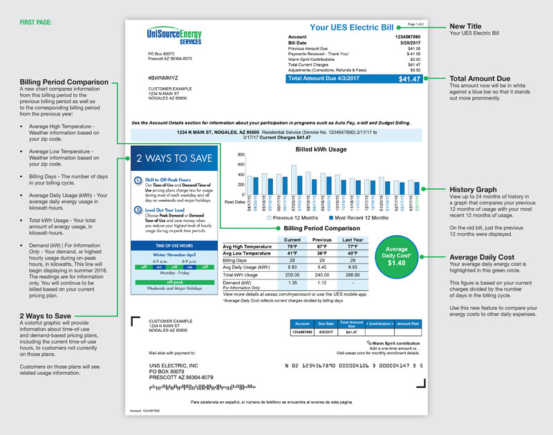
UniSource Energy Services Electric rate plans
UniSource Energy Services offers a variety of electric rate plans for both residential and business customers. In general, residential customers can choose from fixed-rate, time of use, or demand charges. Business customers can choose from similar or additional plans depending on their individual needs.
For residential customers, UniSource Energy Services provides fixed-rate plans, which guarantee the same rate for the length of the contract. This gives customers the peace of mind that their rate will never increase over the term of their agreement. Additionally, customers can opt for a time of use plan, where they are charged different rates depending on the time of day they use electricity. Lastly, UniSource Energy Services offers demand charges, where customers pay a fixed charge based on how much electricity they use at peak times.
For business customers, UniSource Energy Services offers rates similar to residential plans. However, businesses have the added benefit of being able to opt for a custom rate plan. This allows businesses to tailor their rate plan to their specific needs, depending on the type of business they are. Businesses may also be able to negotiate lower rates through UniSource Energy Services.
UniSource Energy Services also provides renewable energy plans. These plans allow customers to lock in a fixed rate for renewable energy sources such as solar or wind. This can help customers reduce their electric bill while also helping the environment.
How can I make a payment online?
Making a payment online with Unisource Energy Services is simple and secure. The first step is to visit the companys website and select the “Pay Bill” option. This will direct users to a secure portal, which requires them to sign in with their username and password. Once users have logged in, they will be given the option to select their preferred payment method. Options include making a payment with a debit or credit card, or by entering bank account information. Customers then enter the amount of their payment and verify the information they have entered. After the payment is complete, a receipt will be sent as confirmation.
