Are you tired of paying those pesky convenience fees when handling your CenturyLink bill online? Maybe you prefer the peace of mind that comes with making payments in cash and getting a receipt right on the spot. Whatever your reason, paying your CenturyLink bill in person is totally doable—even though CenturyLink doesn’t have their own physical stores anymore.
I’ve put together this comprehensive guide to help you find where to pay your CenturyLink bill in person, what to bring with you, and some alternative payment methods that might be more convenient for your situation
Why Some People Prefer Paying CenturyLink Bills In Person
Before jumping into the “where” let’s talk about why you might want to pay your bill face-to-face
- Cash payments – Some folks just feel safer using cash, and in-person payments let you do that
- No convenience fees – CenturyLink charges a $2.50 fee for online and phone payments using credit/debit cards
- Immediate payment confirmation – You’ll get a receipt right away, no wondering if your payment went through
- Bill questions answered – You can talk to a representative about any confusing charges
- Previous online payment issues – If you’ve had problems with online payments in the past, in-person can be more reliable
Where to Pay Your CenturyLink Bill In Person
The big thing to know is that CenturyLink does not have any physical locations where you can pay your bill. This surprises many customers who assume there must be CenturyLink stores somewhere.
Instead, CenturyLink has partnered with two major payment networks that allow you to make in-person payments:
- CheckFreePay
- Western Union
Let’s look at how to use each one.
Paying at CheckFreePay Locations
CheckFreePay has partnered with many retailers across the country, including familiar names like Walmart, Kroger, and CVS. Here’s how to find and use a CheckFreePay location:
- Visit Pay.CheckFreePay.com
- Enter your zip code
- Select “CenturyLink” from the biller dropdown menu
- Review the list of nearby payment locations
- Check their hours and accepted payment methods
- Bring your bill and payment to the CheckFreePay agent
The search results will show you
- The store’s address
- Distance from your location
- Business hours
- Payment types they accept
- Phone payment options (if available)
When you complete your payment, you’ll get a confirmation receipt that serves as proof of payment.
Paying at Western Union Locations
Western Union has a huge network of over 150,000 agent locations throughout the US where you can pay bills in person. Here’s how to find one:
- Go to WesternUnion.com
- Click on “Pay Bills”
- Select “Pay your CenturyLink bill”
- Enter your zip code to see nearby payment locations
At Western Union locations, you can typically pay using:
- Debit/credit cards
- Cash
- Check
- Money orders
Just like with CheckFreePay, you’ll receive a payment confirmation with transaction details as your receipt.
What to Bring When Paying Your CenturyLink Bill In Person
To make sure everything goes smoothly when paying in person, remember to bring:
- Your latest CenturyLink bill – This has your account number and amount due
- Acceptable payment method – Check ahead to confirm what’s accepted at your chosen location
- Government-issued ID – Agents often require ID verification
- CenturyLink account PIN – If you set up a 4-digit PIN for your online account
- A little extra time – There might be lines, especially around bill due dates
Pro tip: I’d recommend calling the payment location before heading over, just to confirm they’re still accepting CenturyLink payments and which payment methods they accept. This can save you a wasted trip!
Other Ways to Pay Your CenturyLink Bill
While this article focuses on in-person payments, it’s worth knowing all your options:
Pay Online
You can log into your MyCenturyLink account at centurylink.com anytime to make payments using:
- Credit/debit card (with a convenience fee)
- Bank account (no fee)
AutoPay
Setting up AutoPay means your bill is automatically paid each month from your:
- Bank account
- Credit card (convenience fee applies)
Pay by Phone
Call 1-800-788-3600 to make payments by:
- Credit/debit card
- Checking account
- Savings account
Note: A convenience fee applies when using credit/debit cards.
Pay by Mail
Send a check or money order to:
CenturyLink P.O. Box 4300
Carol Stream, IL 60197-4300
Make sure to allow 7-10 days for delivery!
PayNearMe Retail Locations
Your bill may include instructions for using PayNearMe, which allows cash payments at over 10,000 participating retail stores.
Avoiding Extra Fees When Paying Your CenturyLink Bill
CenturyLink charges a convenience fee when you use a credit or debit card for one-time payments. Here’s how to avoid paying extra:
- Pay in person at CheckFreePay or Western Union (no convenience fee)
- Use a bank account for online payments through MyCenturyLink
- Enroll in AutoPay using a bank account (not a credit/debit card)
Frequently Asked Questions About Paying CenturyLink Bills
Does CenturyLink have a grace period?
No, CenturyLink does not offer a grace period. Your payment needs to reach them by close of business on the due date.
Can I pay my CenturyLink bill with cash?
Yes, but only at in-person payment locations through CheckFreePay or Western Union agents. CenturyLink doesn’t accept cash payments directly.
What payment methods does CenturyLink accept?
CenturyLink accepts various payment methods including:
- Credit/debit cards (Visa, Mastercard, Discover, American Express)
- Checking accounts
- Savings accounts
- Money orders
- Cash (at in-person locations only)
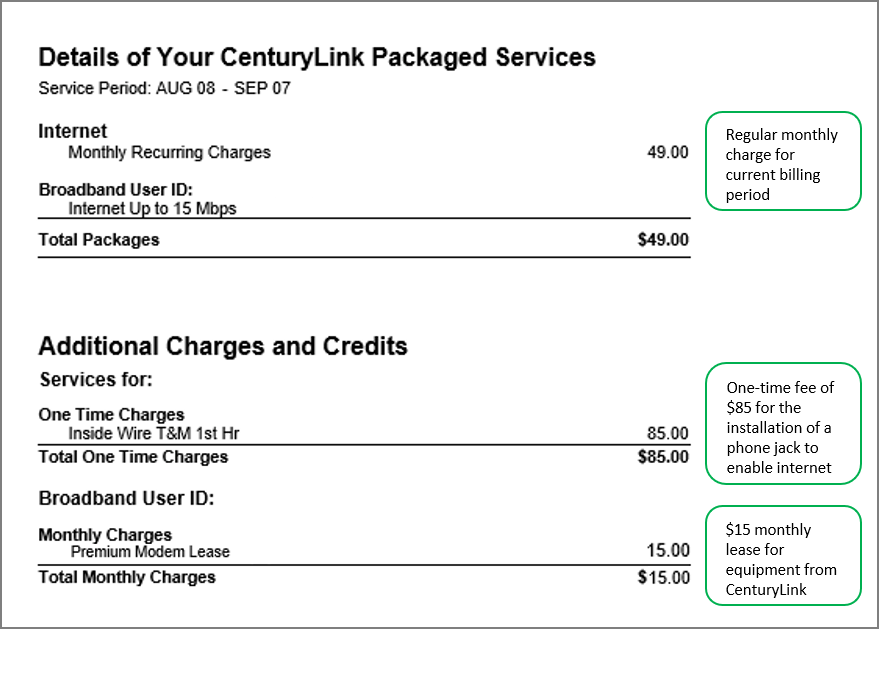
How do I see my CenturyLink bill details?
To view your bill details, sign in to MyCenturyLink online. You’ll need to create an account if you haven’t already.
Can I set up a payment plan with CenturyLink?
Yes, CenturyLink offers payment arrangements. Look for the “Online Payment Arrangement” option in your MyCenturyLink account.
Final Thoughts on Paying Your CenturyLink Bill In Person
While CenturyLink has moved away from having physical stores, they’ve made arrangements to ensure customers who prefer in-person payments have options. The partnerships with CheckFreePay and Western Union give you thousands of locations across the country where you can pay your bill.
Just remember to:
- Find a location near you using the partner websites
- Call ahead to confirm they still accept CenturyLink payments
- Bring your bill and acceptable payment method
- Allow extra time in case there are lines
- Keep your receipt as proof of payment
We all have different preferences when it comes to managing our bills, and it’s nice that CenturyLink still provides in-person options for those who want them. Whether you’re paying with cash, avoiding online fees, or just like the reassurance of a face-to-face transaction, these payment partners make it possible.
Have you tried paying your CenturyLink bill in person? What was your experience like? I’d love to hear about it in the comments!
Additional Resources
For more information about managing your CenturyLink account and payments:
- Download the CenturyLink mobile app
- Visit the CenturyLink support center online
- Call CenturyLink customer service at 1-800-788-3600
Remember that billing locations, hours, and accepted payment methods can change, so it’s always a good idea to verify this information before making the trip.
Happy bill paying!
To pay your bill by phone, call 800-201-4099
There are convenience fees for making one-time payments with an agent or for self-serve payments with a credit or debit card. To avoid this fee:
- Use a bank account when making a one-time payment using the automated phone system.
- Enroll in AutoPay for fee-free automatic monthly payments by checking or savings account.
| Automated phone system | Agent by phone or chat | |
| Checking or savings | no fees | $9.95 fee |
| Credit or debit card | $3.50 fee | $9.95 fee |
As the table shows, there is also a fee for paying with the help of a customer service agent over the phone or chat, regardless of the form of payment. For the most convenient and cost-effective phone service, be sure to use the automated phone system rather than an agent.
Pay using our automated phone system
Have your CenturyLink account number (or the account phone number) and payment information handy. Call the number below and follow the prompts in the automated system to pay your bill. Your payment will be processed immediately, and you will receive a confirmation number at the end of the transaction. There is a $3.50 fee for payment by credit or debit card.
Note: There is a $9.95 fee for payments by phone or chat with an agent, effective March 17, 2023.Learn more about convenience fees.
