Many factors contribute to the increasing popularity of Spectrum among ISPs. Of course, you can count on its variety of internet access plans and optimized plans. Probably one of the most overlooked factors is the convenience of paying your Spectrum bill. This can be confusing at times, though.
In this guide, I have explained the different ways to pay a Spectrum bill. I will also share the pros and cons of each method.
Ever grabbed that red and white Spectrum envelope from your mailbox and thought, “I wish I could just take care of this while I’m already out running errands”? Well, good news! You absolutely can pay your Spectrum bill at Walmart, and I’m gonna walk you through exactly how to do it
As someone who’s tried practically every bill payment method under the sun (online payments, phone payments, carrier pigeon…), I’ve found that sometimes, the in-person option is just more convenient. Maybe you prefer using cash, don’t trust online payments, or just like getting that immediate payment confirmation in your hand.
The Quick Answer: Yes!
Yes, you can pay your Spectrum bill at any Walmart store through their Money Services counter. It’s quick, doesn’t cost extra fees, and gives you that peace of mind knowing your payment went through instantly.
What You Need to Bring to Walmart
Before heading out to pay your Spectrum bill, make sure you have these essentials:
- Your Spectrum account number (find it on your bill or by logging into your online account)
- Cash or debit card (credit cards are NOT accepted for Spectrum payments at Walmart)
- Recent bill (optional, but helpful for reference)
- A little patience (just in case there’s a line at Money Services)
I once made the mistake of forgetting my account number and had to scramble to log into the Spectrum app while standing in line. Learn from my mistakes, folks!
Step-by-Step: How to Pay Your Spectrum Bill at Walmart
Follow these simple steps and you’ll be done in minutes
- Find the Money Services counter at Walmart (usually near the front, by customer service or registers)
- Tell the associate you want to pay a Spectrum bill
- Provide your account number when they ask for it
- Verify the payment amount you want to make
- Choose your payment method – remember, cash or debit only!
- Double-check all details on the screen before confirming
- Get your receipt and keep it safe as proof of payment
The whole process typically takes less than 5 minutes once you’re at the counter. I usually snap a quick photo of my receipt too, just as backup.
Payment Methods Accepted
When paying your Spectrum bill at Walmart, your options are limited to:
- Cash – Bring the exact amount as they don’t give change
- Debit card – Must have a PIN
Sorry, credit card lovers – Walmart doesn’t accept Visa, MasterCard, American Express, or Discover for Spectrum bill payments at their Money Services counter. I learned this the hard way when I tried to pay with my rewards card the first time!
Pro Tips for a Smoother Experience
After paying my Spectrum bill at Walmart several times, I’ve picked up a few tricks:
- Go during off-peak hours – Weekday mornings or mid-afternoons usually have shorter lines
- Have your account info and payment ready before you reach the counter
- Double-check the amount before confirming (once I almost paid my neighbor’s bill amount by accident!)
- Keep your receipt until your next bill arrives, just to be safe
- Don’t wait until the due date – sometimes it takes 1-2 days for the payment to reflect in your Spectrum account
Common Questions About Paying Spectrum at Walmart
Is there a fee for paying my Spectrum bill at Walmart?
Nope! Walmart doesn’t charge any additional fees for processing your Spectrum payment. That’s one reason I like this option.
Can I pay at any Walmart location?
Yes, any Walmart store with a Money Services counter can process your Spectrum payment.
What if I lose my receipt?
Contact Spectrum customer service with the date, time, and Walmart location of your payment. They can look it up for you. I’d recommend taking a photo of your receipt right after payment as backup.
Can I pay a partial amount of my Spectrum bill?
Yes, you can pay any amount towards your Spectrum bill at Walmart, not just the full balance.
What about Spectrum Business accounts?
Unfortunately, you can’t pay Spectrum Business account bills at Walmart – this service is only for residential accounts.
How long does it take for my payment to post?
While the payment is processed immediately, it might take 1-2 business days to show up in your Spectrum account. Don’t panic if it doesn’t appear right away!
Why Choose Walmart for Spectrum Bill Payments?
There are several reasons why paying your Spectrum bill at Walmart might be the right choice for you:
- Convenience – combine bill paying with your regular shopping
- No internet needed – perfect if you’re having connection issues
- Cash option – great if you prefer or need to pay with cash
- Immediate confirmation – you get a receipt right away
- No fees – unlike some payment services that charge extra
- Extended hours – many Walmart locations are open late or 24 hours
Other Ways to Pay Your Spectrum Bill
While Walmart is convenient, it’s good to know all your options:
- Online at spectrum.net (requires account login)
- Spectrum mobile app
- By phone at 1-855-707-7328
- By mail (send check/money order to the address on your bill)
- In person at a Spectrum store
- Automatic payments set up through your Spectrum account
I’ve tried most of these methods, and they each have their pros and cons. The Walmart option shines when you need to make a quick cash payment or you’re already there shopping anyway.
My Personal Experience
Last month, my internet went out right when my Spectrum bill was due. Couldn’t pay online (obviously), so I headed to Walmart while waiting for service to be restored. The whole process took about 7 minutes, including the line wait. The associate was super helpful, and I got my receipt confirming the payment was processed.
One thing I noticed – the Money Services area can get busy during weekends and evenings, so timing your visit can save you some waiting around.
Bottom Line: Quick, Easy, and Convenient
Paying your Spectrum bill at Walmart is definitely one of the most hassle-free options out there. No need to worry about mail delays, website glitches, or spending time on hold with customer service. Just pop into your local store with your account number and payment, and you’re good to go!
Whether you’re a cash-only person, don’t trust online payments, or just happen to be at Walmart already, this payment method is worth keeping in your back pocket.
Remember the basics:
- Bring your account number
- Have cash or debit ready (no credit cards!)
- Keep your receipt
- Allow 1-2 days for the payment to post to your account
Have you tried paying your Spectrum bill at Walmart? Or do you have other questions about the process? I’d love to hear about your experiences!
Final Thoughts
Paying bills isn’t anyone’s favorite activity, but at least Walmart makes the process pretty painless for Spectrum customers. The next time that red and white envelope arrives in your mailbox, you know you’ve got an easy option for taking care of it while checking off other items on your to-do list.
And hey, maybe treat yourself to something nice at Walmart after handling your bill – you deserve it for being financially responsible!
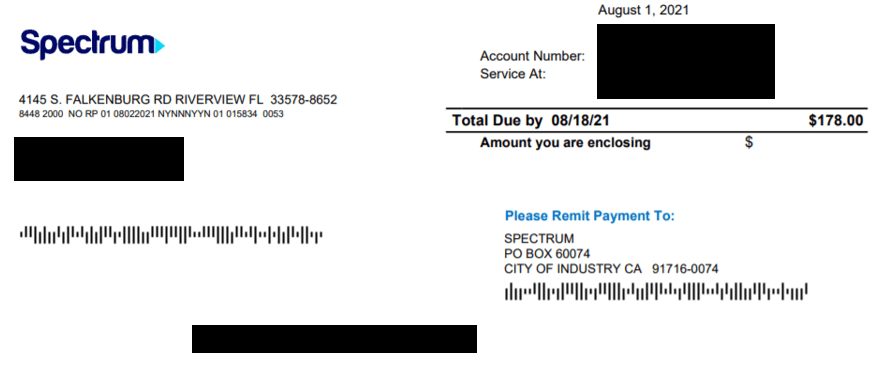
#6 Mail a Check to Spectrum
If you want to use the option, you can also mail a check to Spectrum. Your Spectrum internet bill will contain the address to which you can send the check. Alternatively, you can also place a money order, which will reach the company within the stipulated time. Of course, you should not send cash through postal services.
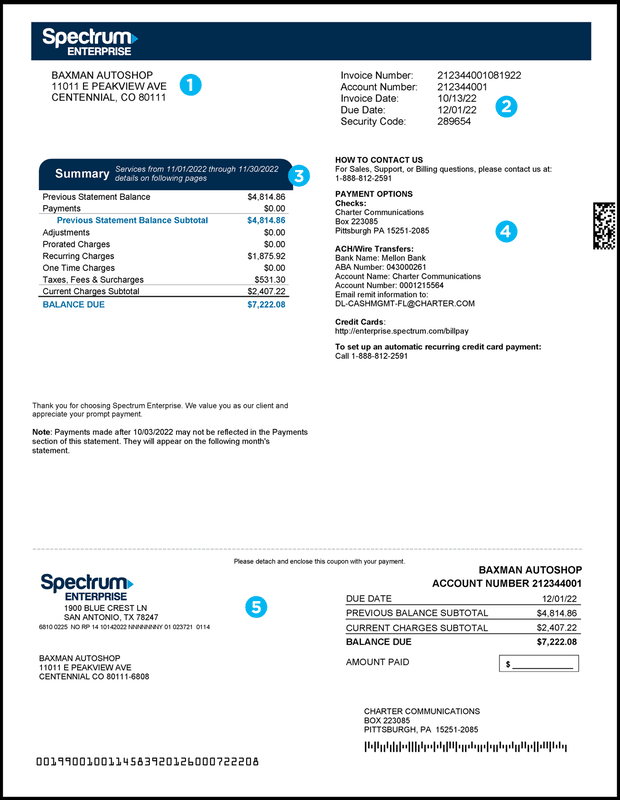
The check remittance option may be beneficial if you would like to keep track of all the payments you make and if you want to stay off the digital footprint, this method can be useful.
#3 Set Up Spectrum Auto Pay Method
You can automate the process of paying Spectrum internet bills using something called Spectrum Auto Pay.
- Log into www.spectrum.net using your Spectrum account details
- Navigate to the Billing section on the account management dashboard
- Click Enroll in Auto Pay to start the Auto Pay setup process
- You can set up the Auto Pay function using your credit/debit cards and bank account
- The Spectrum website may ask the permission to store the payment details
- Once you confirm the action, Spectrum will enable Auto Pay for your account
Spectrum Auto Pay method works like other automatic debit options. The bill amount will be automatically debited from your account, and it will happen on a specific date every month.
Instead of worrying about manually paying the bill, you can simply ensure that you have sufficient funds in your bank account or credit card. A potential issue is that the Auto Pay request may fail if you do not have enough funds, and it might incur additional fees.
