Hey there, fellow Telangana residents! Are you tired of standing in long queues just to pay your electricity bill? I’ve been there too, and let me tell ya, it’s not fun especially during those scorching summer months. Today, I’m gonna walk you through everything you need to know about paying your TSSPDCL (Telangana Southern Power Distribution Company Limited) bill online Trust me, once you start paying digitally, you’ll never look back!
What is TSSPDCL?
TSSPDCL, or the Telangana Southern Power Distribution Company Limited, is the electricity distribution company serving the southern regions of Telangana They’ve made significant improvements in their digital services, making it super convenient for consumers like us to manage our electricity accounts online
Some key info about TGSPDCL (another name you might see):
- GSTN: 36AACCC0125D1ZF
- CIN: U40109TG2000SGC034116
Why Pay Your Electricity Bill Online?
Before I dive into the “how,” let me quickly tell you why online bill payment is the way to go:
- Saves time – No more standing in queues or traveling to payment centers
- Convenient – Pay anytime, anywhere (even at 2 AM in your pajamas!)
- Payment records – Digital receipts for future reference
- Reminders – Many platforms send notifications before due dates
- No late fees – Schedule payments to avoid penalties
Different Ways to Pay TSSPDCL Bills Online
Let’s explore all the options available to pay your electricity bill online
1. Official TGSPDCL Website
The most direct way is through the official website at tgsouthernpower.org.
Steps to follow:
- Visit the official website
- Click on “Online Services”
- Select “Pay Your Bill”
- You’ll be redirected to a page with multiple payment gateways
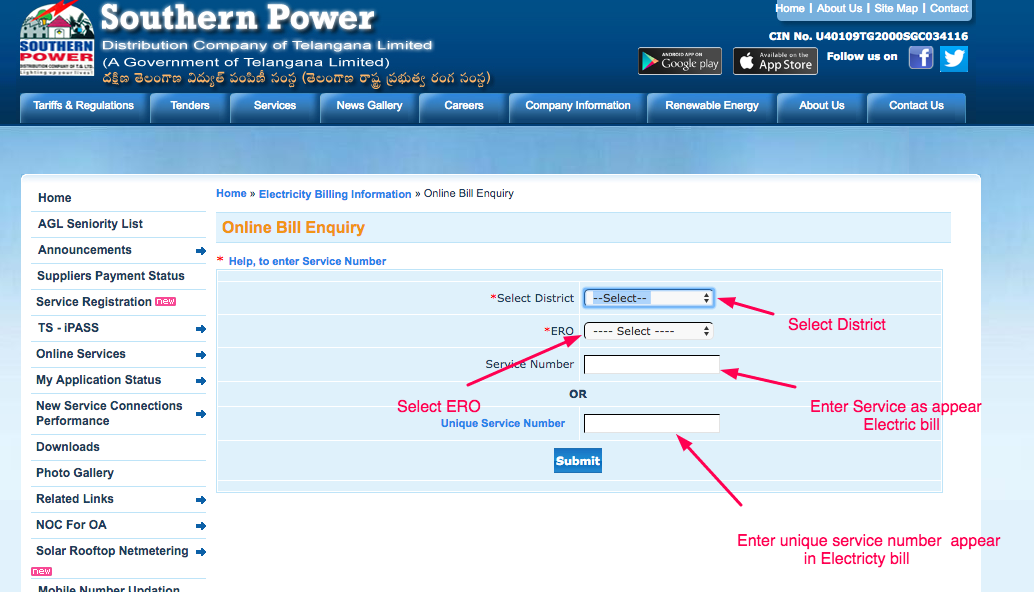
- Enter your Unique Service Number (USC No.) as mentioned on your bill
- Verify your details and proceed with the payment
2. BillDesk Payment Gateway
TSSPDCL has partnered with BillDesk for bill payments. Here’s how to use it:
Steps:
- Go to BillDesk TSSPDCL page
- Choose between “Postpaid Service” and “Prepaid Service” (most consumers use postpaid)
- Enter your Unique Service Number
- Verify your details (name, address, bill amount)
- Select your preferred payment method (credit card, debit card, net banking)
- Complete the transaction
- Save the payment receipt
3. Mobile Apps for TSSPDCL Bill Payment
If you’re like me and prefer doing everything on your phone, these apps are perfect:
- T-App Folio: The official Telangana government app
- PhonePe: Super popular and easy to use
- Paytm: Another popular option with a user-friendly interface
- Google Pay: Quick payments with UPI
4. Other Authorized Payment Services
TGSPDCL has partnered with multiple service providers to make bill payments even more accessible:
| Service Provider | Contact Number | |
|---|---|---|
| APTOnline | – | [email protected] |
| BillDesk | 040-42005000, 040-48208866 | [email protected] |
| MeeSevaOnline | 1100, 18004251110 | [email protected] |
| Paytm | 1203888388 | [email protected] |
| TA Wallet | 9916788339 | [email protected] |
| T-Wallet | 1100, 18004251110 | [email protected] |
| PhonePe | 080-68727374 / 022-68727374 | [email protected] |
| Amazon Pay | 022-30430101 | [email protected] |
Step-by-Step Guide to Pay Your TSSPDCL Bill Online
Now, let me give you a detailed walkthrough of the process. I’ve paid my bills online for years now, so I’ve got this down to a science!
Step 1: Gather Your Information
Before you start, keep these things handy:
- Your Unique Service Number (USC No.)
- Your bill details (amount due, due date)
- Your preferred payment method (card/UPI/net banking)
Step 2: Choose Your Platform
Select any of the payment options mentioned above. If you’re a first-timer, I’d recommend using the official TGSPDCL website since it gives you multiple payment gateway options.
Step 3: Enter Your USC Number
This is the most important part! Your Unique Service Number is printed on your electricity bill. Double-check this number before proceeding.
Step 4: Verify Your Details
Once you enter your USC number, the system will display:
- Consumer name
- Bill amount
- Due date
- Address
Always verify these details before proceeding with the payment.
Step 5: Select Payment Method
Choose your preferred payment method:
- Credit Card
- Debit Card
- Net Banking
- UPI
- Mobile Wallets
Step 6: Complete the Transaction
Follow the prompts to complete your payment. Keep your internet connection stable during this process.
Step 7: Save the Receipt
After successful payment, you’ll receive a confirmation with a transaction reference number. Save or download this receipt for your records. I always take a screenshot too, just to be safe!
Important Things to Remember
-
Failed Transactions: If your transaction fails due to technical reasons, the payment will be updated within 48 hours. If not, the bank will refund the amount within 3-7 working days.
-
Verification: Always verify that you’re paying on an authorized platform. TGSPDCL clearly states they are “not responsible for consumer payments made through any mode other than the mentioned empanelled Service Providers.”
-
Bill Status: If your bill shows “Stopped” (Status: 99), it won’t be displayed on the website.
-
Double Payments: If your payment is successfully updated, your outstanding bill amount will show “Zero” when you attempt to pay again.
-
Bank Payments: Many banks allow you to set up automatic bill payments through their websites. You can register your USC number in their “Bill Payment Service” option.
What If I Face Issues While Paying Online?
Don’t worry, it happens to everyone! Here’s what you can do:
-
Check your internet connection – Make sure you have a stable connection
-
Contact the payment service provider – Use the contact details provided in the table above
-
Contact TSSPDCL customer service – Reach out to [email protected]
-
Try a different payment method – If one method doesn’t work, try another
Prepaid vs. Postpaid Services
TSSPDCL offers both prepaid and postpaid services. Most residential consumers use postpaid services, where you pay after consuming electricity. However, prepaid meters are becoming increasingly popular.
With prepaid meters:
- You pay in advance
- You get better control over your electricity consumption
- You can recharge just like a mobile prepaid connection
- You get notifications when your balance is low
If you have questions about prepaid meters, check out the FAQs section on the TGSPDCL website.
Additional Online Services Offered by TGSPDCL
Besides bill payment, TGSPDCL offers several other online services:
- Bill Enquiry: Check your bill details without logging in
- New Service Registration: Apply for a new electricity connection
- Consumer Service Requests: Submit various service requests
- No Power Complaint: Report power outages
- Know Your UKSCNO: Find your unique service number
- Solar Rooftop Net Metering: Apply and track applications for solar installations
My Personal Experience with TSSPDCL Online Bill Payment
I’ve been using the online payment system for about 3 years now, and it’s been a game-changer! Before this, I would often forget to pay my bill on time and end up paying late fees. Now, I get reminders on my phone, and it takes less than 2 minutes to complete the payment.
My favorite method is using PhonePe – it’s quick, reliable, and I get instant confirmation. Plus, sometimes they offer cashback too (who doesn’t love a good deal, right?).
One time, I did have a failed transaction, and I was worried about my money. But true to their word, I got the refund within 4 days. So, from my experience, the system is pretty reliable.
Final Thoughts
Paying your TSSPDCL electricity bill online is definitely the way to go in 2025. It saves time, reduces hassle, and gives you better control over your payments. With so many payment options available, you can choose whatever works best for you.
Remember to always keep your bill receipts and transaction IDs handy, just in case you need to follow up on a payment.
Have you tried paying your electricity bill online yet? If not, I highly recommend giving it a shot. Trust me, once you experience the convenience, you’ll wonder why you didn’t start sooner!
If you have any questions or experiences to share about online bill payment, drop them in the comments below. I’d love to hear from you!
Frequently Asked Questions
Q: Is it safe to pay my electricity bill online?
A: Yes, it’s safe as long as you use the authorized payment gateways mentioned on the official TGSPDCL website.
Q: What do I need to pay my bill online?
A: You need your Unique Service Number (USC No.), a device with internet connection, and a payment method (credit/debit card, UPI, etc.).
Q: How long does it take for the payment to reflect in my account?
A: Usually, payments are updated immediately. However, in case of technical issues, it might take up to 48 hours.
Q: Can I set up automatic payments for my electricity bill?
A: Yes, many banks offer the option to set up standing instructions for bill payments through their net banking services.
Q: What if I accidentally make a double payment?
A: If your payment is already updated, the system will show a zero balance when you try to pay again. If you still make a payment, the excess amount will be adjusted in your next bill or refunded.
Electricity billers across India
Apart from TSSPDCL electricity bill payment online, you can pay other electricity provider’s bills across India on Bajaj Finserv such as
TSSPDCL (Telangana State Southern Power Distribution Company Limited) – Tariff rates
|
Category |
Unit |
Tariff rate (Rs. ) |
|
|
Residential |
KW |
2.72 |
|
|
Non-domestic |
KW |
9.76 |
|
|
Industrial |
KW |
8.29 |
|
|
Agricultural |
KW |
1.04 |
|
|
Street lighting |
KW |
4.58 |
|
|
Lt (Line transformers) |
KW |
0.57 |
|
|
HT (Distribution transformers) |
KVA |
0.91 |
|
|
LT (Poles and CTS) |
1000 MT |
1.1 |
|
|
HT (Lines) |
KM |
1.1 |
|
|
Metering charges |
Unit |
4 |
|
|
Fixed charges |
Unit |
9 |
|
